

Why this project stayed with me
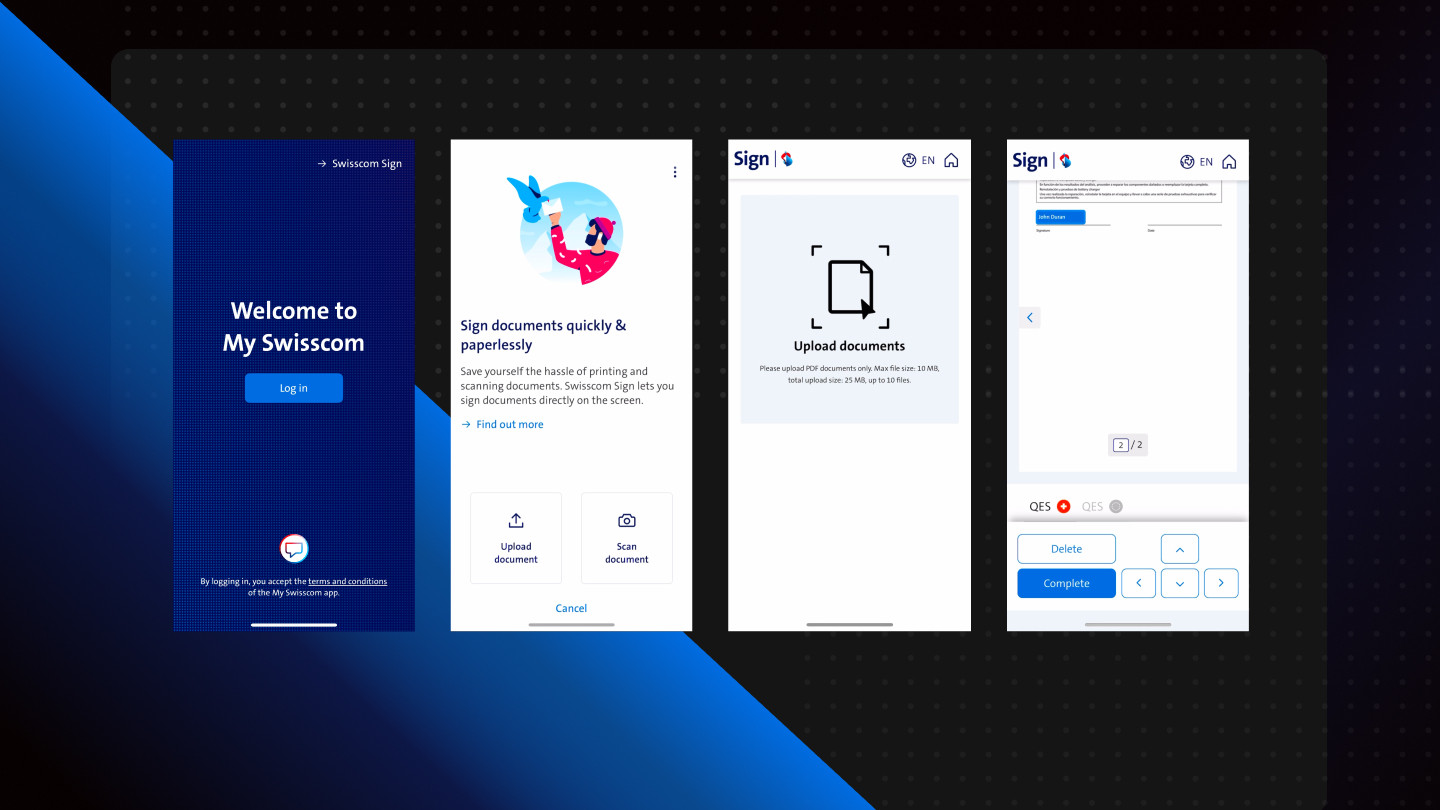
Swisscom Sign lives inside myswisscom (roughly 3 million users in Switzerland) and on sign.swisscom.ch. On paper it was an Angular integration. In practice it was a crash course in adaptive form flows, qualified electronic signatures (QES), and 2D document geometry where users place visible signature stickers on uploaded PDFs.
The work case study lists stack and outcomes. This post is the story from the engineer's chair: what excited me, what hurt, and what I would tell the next team before mixing AEM Forms with a host Angular app.
Adaptive forms inside an Angular shell
One of the most exciting parts was seeing AEM Forms adaptive forms run as steps inside a larger Angular application. Adobe's adaptive forms module is powerful in its own lane: a visual editor to drag and drop field types, wire validations, and attach rules without rebuilding every screen by hand. Advanced rules can call JavaScript under the hood so individual fields carry non-trivial logic while still looking manageable in the editor.
For teams that live in Experience Manager, that is a real productivity win. The early signature flow even used form steps for some of the first screens before the user reached the document canvas.
The tradeoffs showed up quickly when the host app is not AEM:
- Two runtimes, one user journey: routing, auth, and analytics must stay coherent across AEM-hosted fragments and Angular routes.
- Release coupling: a form rule change and an Angular component change may need different pipelines and owners.
- Debugging across boundaries: when a validation fails, is it adaptive form JavaScript, Angular event wiring, or the Blink API contract?
A scar at the seam
The clearest failure I remember: an adaptive form step validated and looked complete in the AEM UI, but the Angular shell did not advance to the document upload screen. The adaptive layer fired success; the host router never received a payload shape it understood. We lost an afternoon tracing three stacks before we found a mismatched completion event, not a bad validation rule.
That is the tax of dual runtime: every handoff needs an explicit contract (event name, payload, error surface), not an assumption that "green in the form editor" means "green in the SPA."
I still respect adaptive forms for what they are: a strong option when form-heavy workflows stay inside the AEM ecosystem. Embedding them in Angular is doable and can be the right call for time-to-market, but it is not free architecture. I plan a deeper AEM Forms piece later; Adobe's Experience Manager Forms docs are the official starting point until then.
Qualified signatures and Swisscom Trust
The moment the project clicked for me was understanding digital signatures as document-bound certificates, not just a PNG on a PDF.
With QES (qualified electronic signature), each signed document gets a unique cryptographic binding. Change a byte after signing and the signature breaks. That is the property users and regulators care about, even when the UI looks like dragging a sticker.
Swisscom operates this under Swisscom Trust. The useful mental model for me was parallel to TLS for websites: both rely on a chain of trust and certificates, but QES follows eIDAS / qualified trust service rules, not WebPKI. Domain TLS proves site identity to a browser; QES proves document integrity and signer identity to a downstream verifier. Same shape of thinking, different spec.
My scope was placement UI in Angular plus the integration layer that sends sticker coordinates and document context to the signing service. I did not own the qualified signature engine itself. The UI problem is approachable; the trust chain behind it is not. You need clear ownership of which layer validates what before product copy says "legally binding."
A 2D workspace for stickers
Users do not "sign" in the abstract. They position a visible sticker on a rendered page: move along X and Y, avoid overlap, respect regions the document allows.
That turned into a 2D interaction model on the frontend:
- Pointer vs touch in one codebase (desktop drag vs mobile touch).
- Collision and bounds so stickers cannot sit on top of each other or outside valid areas.
- State that survives resize and orientation changes without losing placement.
We hit a second scar on mobile: a sticker placed correctly in portrait drifted after rotation because page scale and coordinate space were not recalculated together. Fixing that taught me that geometry is product logic, not polish you add at the end. If QES binds to coordinates, a pixel drift is not a cosmetic bug.
The work page mentions cross-platform events; this post is the why behind them.
Shipping inside a live app
The signature flow had to mount in existing navigation, including screens before login on mobile and on a dedicated web route. Modular Angular components (inputs/outputs, no host-page assumptions) let the same experience render in more than one shell. Tooling details (Blink API, Figma, Insomnia, GitHub test deploys) are on the work case study; the constraint worth repeating is brownfield, not greenfield.
What I took away
1. Adaptive forms + SPA can ship fast and teach you Adobe's form model deeply; budget for dual-stack operations and explicit handoff contracts.
2. QES and trust services deserve a separate learning track from Angular components; the UI is the easy part.
3. 2D placement is signature UX; treat coordinates, collision, input modes, and rotation as first-class requirements.
4. Cross-platform is event strategy and layout discipline, not only responsive CSS.
I still use Swisscom Sign privately for contracts. The feature is live; the learning was in the seams between form engines, trust, and canvas math.
Next: a dedicated post on AEM adaptive forms (rules, validations, when to stay native vs embed). Questions on adaptive forms inside SPAs: LinkedIn.
Related: Swisscom Sign work case